This article synthesizes publicly available product documentation, pricing pages, and third-party comparisons. It is not based on paid hands-on testing by the author.
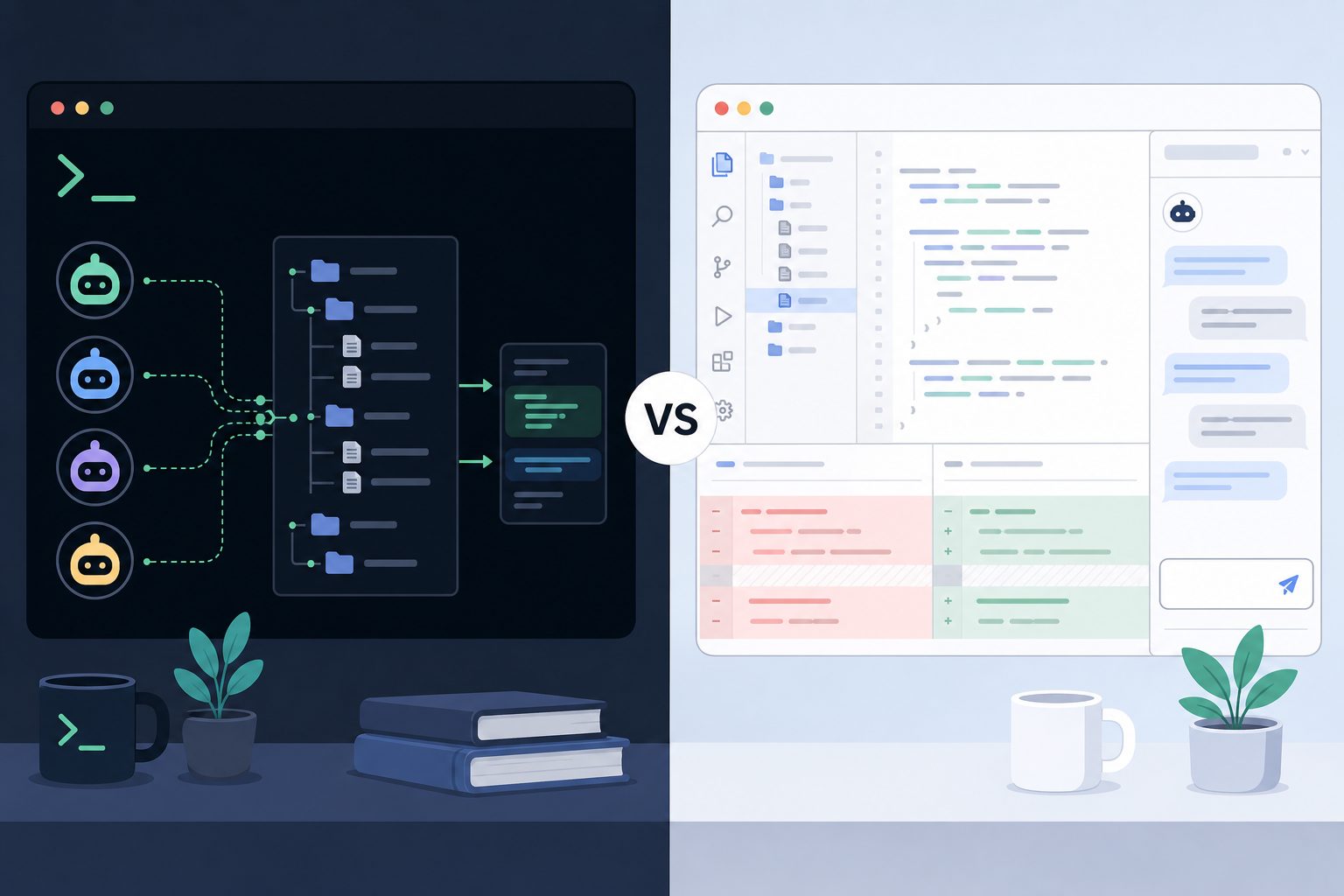
Claude Code vs Cursor is less a contest between identical products than a choice between two coding surfaces. Claude Code is Anthropic’s terminal-native coding agent. Cursor is an AI-native IDE built on a VS Code fork.
The distinction affects where a developer reviews changes, supplies context, and keeps work moving. Match the primary tool to the existing review loop, then confirm current plan limits on official pages.
How we compared Claude Code vs Cursor
This comparison separates the products by primary working surface rather than treating every AI coding feature as equivalent. It draws on Claude Code documentation, Cursor documentation, and verified pricing pages, so it is a decision framework rather than a performance benchmark.
The practical questions are:
- Where does coding work normally happen: a shell or an IDE?
- Does the task call for interactive edits or a longer agentic loop?
- Is visual review inside the editor important?
- Does model choice inside the IDE affect the workflow?
- Does the price and usage model fit expected volume?
Workflow surface matters because it changes the review loop. A terminal-first agent can suit repository-wide tasks and headless environments. An IDE-first tool can keep autocomplete, chat, and diffs close to the source file.
This guide does not claim that one product is universally faster or cheaper. Both products list a $20/month entry paid tier as of July 2026, but metering differs. Same headline price does not mean the same capacity for a given workload.
Quick comparison table
The table summarizes the verified product surfaces and official entry pricing as of July 2026.
| Tool | Primary surface | Workflow style | Context and agents | Model access | Entry pricing (official, as of Jul 2026) | Best-fit persona |
|---|---|---|---|---|---|---|
| Claude Code | Terminal-native CLI | Delegate, agentic, terminal-first | Filesystem work, multi-file refactors, longer autonomous loops, hooks and guardrails; CI-friendly headless use | Claude models (Anthropic) | Claude Pro at $20/month ($17/month annual); includes Claude Code. Claude Max from $100/month for heavier use | Terminal-heavy, SSH, CI, or repository-wide work |
| Cursor | AI-native IDE (VS Code fork) | Drive, interactive, IDE-first | Inline diffs, tab completion, chat, Composer/Agent modes | Multi-model routing | Hobby free; Individual Pro from $20/month; Teams $40/user/month | Developers who edit and review in a VS Code-style interface |

Pricing is not identical even when both start near $20/month. Cursor meters included model usage plus on-demand billing. Anthropic meters subscription usage limits on Pro and Max. Compare capacity against expected volume, not labels alone. Verify current terms on the Cursor pricing page and Claude pricing page.
Tool-by-tool notes
The clearest contrast is between delegating work from a shell and guiding work from an IDE. Both products can support multi-file tasks. Their default interaction patterns still lead to different habits.
Claude Code
Claude Code is positioned in its official documentation as a coding agent that works from the shell and with the filesystem. Its editor-agnostic approach fits developers who already use a terminal as the control point for repositories, remote machines, or automation.
The product is framed as a delegate, agentic workflow: assign a broader task, let longer loops run, and review the resulting repository changes. Hooks and guardrails matter when the agent must stay inside a controlled process. CI-friendly headless use is part of that same terminal-first design.
A terminal interface is not automatically preferable for every task. A developer who wants to inspect suggestions as inline editor changes may find the workflow less direct. That friction is highest when small edits and immediate visual feedback make up most of the day.
Cursor
Cursor is an AI-native IDE based on a VS Code fork. According to Cursor’s documentation, its product surface includes tab completion, chat, Composer or Agent modes, and multi-model routing.
Cursor is framed as a drive, interactive environment. The value is not merely having an agent. It is keeping suggestions, visual diffs, and source navigation in the same place where code is already being written.
For a closer discussion of that daily-editor perspective, see Why I Use Cursor. That linked article is an internal perspective. This comparison itself remains a synthesis of public sources.
Cursor may be the more natural fit when the work is a series of short changes that need continual review. It is less clearly aligned with a workflow centered on SSH, headless automation, or a shell-driven pipeline.
Different paths to the same repository
The products can be evaluated by the moment when a developer wants to intervene. Claude Code’s terminal-first framing favors assigning a broader task, checking progress, and reviewing filesystem results. Cursor’s IDE-first framing favors directing work while a file, diff, or chat conversation is already in view.
Neither pattern removes the need to inspect changes. The difference is where that inspection begins: the command line and filesystem for Claude Code, or the editing interface for Cursor. Teams with established review rules should consider which surface makes those rules easiest to preserve.
The tools can also coexist without being substitutes in every session. Several third-party write-ups describe Cursor as the daily interactive environment and Claude Code as a separate option for heavier agentic work. That pattern is a workflow suggestion, not a requirement.
Official pricing as of July 2026
Cursor’s pricing page lists a free Hobby plan. Individual plans start at $20/month for Pro, with higher Pro+ and Ultra tiers above it. Those higher Individual prices are not listed on the pricing page, so readers should check the page rather than guess. Teams is $40/user/month. Every plan includes a set amount of model usage; extra on-demand usage is billed in arrears.
Claude’s pricing page lists Claude Pro at $20/month billed monthly, or $17/month with annual billing ($200 up front). Pro includes Claude Code. Claude Max starts at $100/month with 5x or 20x the usage of Pro, and is the tier aimed at heavy agentic use. Team seats are $25/seat/month billed monthly, or $20 annually.
Both entry paid tiers are $20/month. Metering still differs: Cursor combines included usage with on-demand billing, while Anthropic uses subscription usage limits across Pro and Max. Choose the plan by expected session volume, not by matching the headline number.
Which tool should you choose?
The best choice follows the working environment and review style, not a generic ranking. Claude Code vs Cursor becomes easier to resolve when the intended job is specific.
- Terminal-heavy workflows: Lean toward Claude Code when repositories are managed from a shell, work happens over SSH, or CI-friendly headless use is important.
- Interactive IDE editing: Lean toward Cursor for VS Code-style editing, autocomplete, chat, and visual diffs throughout the day.
- Large autonomous refactors: Claude Code is the stronger match when a task needs a longer agentic loop across many files.
- Visual multi-file changes: Cursor fits developers who want to inspect and steer multi-file work inside the IDE.
- Two complementary tools: Public comparisons often describe a dual-tool pattern: Cursor for daily editing and Claude Code for heavier agentic sessions.
The dual-tool option is sensible only when the duplicated subscription and context switching are justified. A personal agent/harness workflow can help clarify where an IDE-based agent fits beside terminal-based delegation.
Choose the review loop before comparing plan labels. A tool that matches the normal edit-review cycle is more likely to be useful than one selected solely for a long feature list.
FAQ
The FAQ resolves common category questions before a subscription decision is made.
Are Claude Code and Cursor the same kind of product?
No. Claude Code vs Cursor is a category mismatch as much as a brand choice. Claude Code is a terminal-native coding agent that works from a shell and with the filesystem. Cursor is an AI-native IDE based on a VS Code fork, with AI features integrated into the editor workflow.
Can Claude Code be used without leaving a current editor?
Yes. Its terminal-native and editor-agnostic design means it can operate from a shell alongside an existing editor. The trade-off is that its primary interaction surface is not the IDE itself.
Is Cursor only for VS Code users?
Cursor is based on a VS Code fork, so its interface is most familiar to people accustomed to that style of editor. The relevant question is less prior VS Code use than whether an IDE-first workflow with inline assistance and visual diffs is wanted.
Should a solo developer pay for both?
A dual-tool setup can work when Cursor covers interactive daily editing and Claude Code covers more agentic refactor sessions. Paying for both is worth considering only if those distinct workflows occur often enough to justify separate usage limits and costs.
How should current pricing be compared?
Start with the official pricing pages, then compare included usage models rather than only the monthly headline. As of July 2026, both Cursor Pro and Claude Pro start at $20/month, while Claude Max starts at $100/month for heavier agentic use. Confirm current terms before buying.