This is an editorial synthesis of product documentation and published material, not a firsthand test. Product limits, plans, and capabilities can change; verify current details with each vendor.
Cursor vs Copilot vs Windsurf is less a contest over one autocomplete feature than a choice about where AI belongs in a development workflow. Cursor and Windsurf are AI-native editors built from the VS Code lineage, while GitHub Copilot is an assistant that works inside many established IDEs.
The meaningful differences are the editor surface, the path from a request to a multi-file change, and the meter behind paid usage. A developer who wants to keep JetBrains or Neovim has a different decision from one who wants an agent-centered editor.
How we compared Cursor vs Copilot vs Windsurf
The setup matters. This guide compares the products through six practical questions: what is installed, how an agent takes action, where it works, how it holds codebase context, what official pricing signals indicate, and which workflow it most naturally supports.
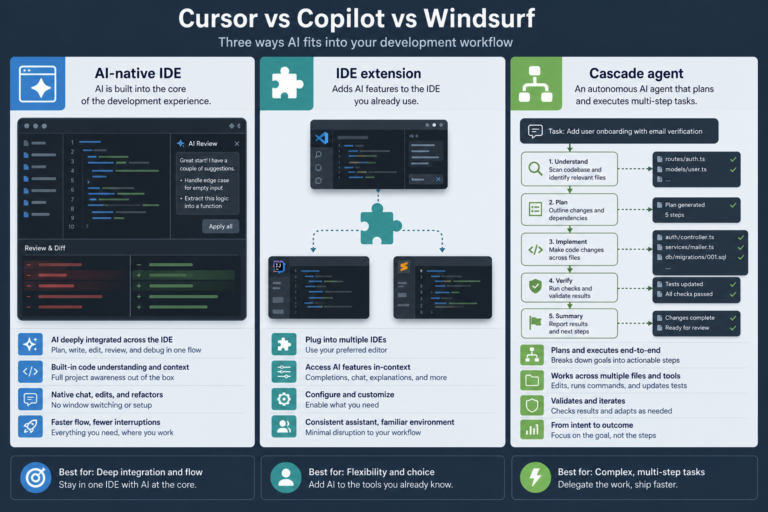
The first distinction is product shape. Cursor is a standalone AI-native IDE from Anysphere. Windsurf is an AI-native IDE with the Cascade agent. GitHub Copilot is an extension and assistant from GitHub/Microsoft, rather than a full replacement IDE.
That distinction affects adoption before a prompt is written. Cursor and Windsurf ask a team to use a VS Code-fork editor. GitHub Copilot can stay within VS Code, Visual Studio, JetBrains IDEs, Vim/Neovim, Xcode, and other supported environments.
The second distinction is agent reach. Cursor Composer and Agent modes are oriented around planned, approved, multi-file changes. Windsurf Cascade is framed around carrying a multi-step plan through files and terminal actions. GitHub Copilot combines an in-editor agent mode with a coding agent on GitHub that can take work from an Issue to a pull request.
Public comparisons list MCP support for all three in 2026 tables. That shared checkbox is not enough to choose among them. The useful question is whether external tools belong in an existing IDE workflow, an AI-native editor, or a GitHub-centered delivery path.
For related decisions around the Cursor ecosystem, see why developers use Cursor, Cursor vs Windsurf, and a personal Cursor workflow harness.
Quick comparison table
Official entry prices below were verified on each vendor’s pricing page as of 2026-07-20. Same headline price does not mean the same usage capacity.
| Tool | Primary product | Agent style (public framing) | IDE coverage | Context approach | Entry pricing signal | Best-fit persona |
|---|---|---|---|---|---|---|
| Cursor | AI-native IDE / VS Code fork | Composer and Agent for plan-and-approve, multi-file work; cloud/background agents | Standalone editor | Codebase indexing supports Tab and chat; multi-model routing | Hobby free; Pro $20/mo; Teams $40/user/mo (Cursor pricing) | Developer seeking deep AI-native editor workflows |
| GitHub Copilot | IDE extension and assistant | In-editor agent plus GitHub.com coding agent from Issue to PR | Broad: VS Code, Visual Studio, JetBrains, Vim/Neovim, Xcode, and more | Context through the active editor and GitHub workflow | Free $0; Pro $10/user/mo; Pro+ $39; Max $100 (Copilot plans) | Team retaining its current IDE and GitHub process |
| Windsurf | AI-native IDE / VS Code fork | Cascade plans and executes across files and terminal; parallel sessions and worktrees | Standalone IDE plus JetBrains plugin | Riptide indexing and Memories / Flow-style context | Free $0; Pro $20/mo; Teams $80/mo base + $40/mo per full dev seat (Windsurf pricing) | Developer prioritizing Cascade-style multi-step autonomy |
All three advertise free tiers, but metering differs. Cursor uses included model usage plus on-demand arrears. GitHub Copilot uses monthly AI credits on paid tiers. Windsurf uses daily or weekly-refreshing quotas plus API-priced overage. Verify current terms on each official plans page before budgeting agent-heavy work.
Tool-by-tool notes
Three product philosophies are clearer than feature checklists. Each product supplies completion and chat, but the surrounding workflow determines what those features feel like day to day.
Cursor
Cursor treats the editor as the primary AI surface. Its Tab completion, chat, Composer, and Agent modes sit inside an AI-native VS Code fork. Multi-model routing and codebase indexing are intended to make repository context available across completion and conversation. Official details live in the Cursor documentation.
Composer and Agent are the important distinction for multi-file work. The documented pattern is to state a goal, review a plan or proposed edits, and approve changes as they span the repository. Cursor also offers cloud or background agents and Bugbot-style pull-request review.
On pricing, as of 2026-07-20 the Cursor pricing page lists Hobby free, individual plans starting at $20/month for Pro, and Teams at $40/user/month. Pro+ and Ultra sit above Pro; their prices are not listed on that page, so readers should check it directly. Included model usage varies by plan, with on-demand extra usage billed in arrears.
This makes Cursor a strong fit when changing editors is acceptable and agent depth is more valuable than retaining a familiar IDE. It is less naturally aligned with a developer whose daily tools are a non-VS-Code editor and who does not want a migration.
For a narrower comparison of the two AI-native editors, consult this Cursor vs Windsurf guide.
GitHub Copilot
GitHub Copilot is the least disruptive option because it is an assistant installed where developers already work. Its inline completions, chat, and agent capabilities appear across a broad editor set. A team can add AI support without standardizing on a new standalone editor. See the GitHub Copilot documentation for supported environments and agent features.
Its distinctive agent path is GitHub-native: the coding agent can work from an Issue to a pull request on GitHub.com. That path matters for teams where assignment, review, CI, and governance already flow through GitHub rather than through a single editor session.
Third-party roundups usually place GitHub Copilot behind Cursor and Windsurf for the deepest in-editor autonomous work on very large refactors. That is a framing, not a universal result. Wider IDE support and GitHub lifecycle integration solve a different problem.
On pricing, as of 2026-07-20 the GitHub Copilot plans page lists Free at $0 (2,000 completions/month), Pro at $10/user/month with $15 monthly AI credits, Pro+ at $39/user/month with $70 credits, and Max at $100/user/month with $200 credits. Business and Enterprise organization plans also exist; confirm those prices on the same page rather than from secondary summaries.
Enterprise roundups emphasize GitHub policy alignment and IP indemnity when organizations evaluate Copilot Business or Enterprise. Procurement and legal requirements should be confirmed against current GitHub terms.
Windsurf
Windsurf organizes its AI-native editor around Cascade. According to the Windsurf getting-started documentation, the product provides its own development environment. Its VS Code-fork lineage remains central even where JetBrains plugin coverage broadens the available surfaces.
Cascade is framed as a multi-step agent that can plan then execute across files and terminal work. Newer product coverage also describes parallel Cascade sessions and Git worktrees. Riptide indexing and Memories support large-repository context discussions.
On pricing, as of 2026-07-20 the Windsurf pricing page — now branded under Devin (Cognition) — lists Free at $0, Pro at $20/month (frontier models, free SWE 1.7 usage, Devin Cloud), Max at $200/month, and Teams at $80/month base plus $40/month per full developer seat. Copilot Pro at $10/month remains the cheapest paid entry of the three; Cursor Pro and Windsurf Pro both sit at $20/month.
Windsurf therefore fits developers who want an agent-forward editor and Cascade’s flow-oriented model. Headline price parity with Cursor Pro is not a capacity comparison, because credits and included usage can differ materially.
Which tool should you choose?
Choose the workflow. There is no universal winner in Cursor vs Copilot vs Windsurf because the best choice begins with the editor and delivery system a developer or team actually needs.
- Choose Cursor when the priority is maximum AI-native editor depth, including Composer/Agent-oriented multi-file work, and moving to a VS Code fork is acceptable.
- Choose GitHub Copilot when the priority is keeping JetBrains, VS Code, Neovim, Xcode, or another existing IDE while adding a serious paid assistant. It is also the clearest match when GitHub Issue-to-PR automation is central, and when the $10/month Pro entry price matters.
- Choose Windsurf when Cascade-style multi-step autonomy and Memories-style repository context are the main draw.
For teams, standardization should follow a short evaluation against representative tasks: a small local change, a cross-file feature, and a reviewable GitHub workflow. Compare the approval model, context quality, metered use, and repository policy rather than only the first suggestion each tool produces.
Some teams evaluate two tools before choosing one, but running competing completion engines together can create distracting suggestions and muddle cost tracking. A shared default with documented exceptions is usually easier to support.
Teams considering an AI-native editor alongside other assisted workflows can also read this comparison of Cursor and another agent-oriented setup.
FAQ
Product category first. A generic “best AI coder” label is less useful than matching surface, agent path, and metering to the real workflow.
What is the one-line difference in Cursor vs Copilot vs Windsurf?
Cursor is an AI-first standalone editor centered on Composer and Agent. GitHub Copilot is a broad IDE assistant with GitHub-native Issue-to-PR capability. Windsurf is an AI-native editor centered on the Cascade agent.
Can a developer keep JetBrains or Neovim and still use one of these?
GitHub Copilot is the direct fit because it supports JetBrains and Vim/Neovim among its broad set of editor surfaces. Windsurf also offers JetBrains plugin coverage, but its core product is still an AI-native IDE. Cursor is primarily a standalone VS Code fork.
Is Cascade the same as Composer?
No. Both are used for work beyond a single inline completion, and both are framed around multi-file changes. Cursor emphasizes Composer and Agent modes with planning and approval. Windsurf centers its approach on Cascade planning and execution across files and terminal actions.
Why do Pro prices look different from actual billable usage?
The listed subscription is only one layer of the cost model. As of 2026-07-20, Cursor Pro and Windsurf Pro both start at $20/month, while GitHub Copilot Pro starts at $10/user/month — but Cursor meters included usage plus arrears, Copilot meters monthly AI credits, and Windsurf meters refreshing quotas plus overage. Verify current plan details before estimating a heavy agent workload.
Should a team standardize on one tool?
Usually, a default tool reduces onboarding friction, support effort, and policy ambiguity. An exception can be sensible when a role depends on an unsupported editor or a GitHub-specific workflow, but the exception should have a clear reason and owner.
Sources
- Cursor documentation
- Cursor pricing
- GitHub Copilot documentation
- GitHub Copilot plans
- Windsurf getting started
- Windsurf pricing
- PE Collective: Cursor vs Copilot vs Windsurf
- SimilarLabs: Cursor vs Windsurf vs GitHub Copilot
- Computer Tech: Cursor vs Windsurf vs GitHub Copilot
- TryAnAI: Cursor vs Windsurf vs GitHub Copilot
- TechPulseSite: Cursor vs GitHub Copilot vs Windsurf